Play99Exch Login Guide
Logging in to your Play 99 Exch account is quick once you have your ID. Follow these steps to sign in safely on the genuine site.
- Go to the official play99exch.in homepage — check the address carefully before you enter anything.
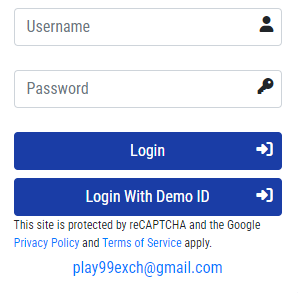
- Find the Login box at the top of the homepage.
- Enter the username we sent you when your ID was created.
- Enter your password. Both are case-sensitive, so type them exactly as provided.
- Tap Login to open your Play99Exch account and start playing.
Forgot your password or cannot log in?
The most common reason a login is refused is a small typo in a case-sensitive username or password, so check those first. If you still cannot get in, or you have forgotten your details, message us on the same WhatsApp number that set up your ID and our team will help you recover access — usually while you wait in the chat.
Log in safely
Always reach the login through the official play99exch.in address or your own bookmark, never a link forwarded to you, because lookalike sites copy the design to capture logins. We will never ask for your password or OTP, and no genuine withdrawal ever needs an upfront “release fee” — treat any such request as a scam. Don’t have an ID yet? Sign up here in a short WhatsApp chat. Play99Exch is strictly for adults aged 18 and over; please play responsibly.
Logging in to Play99Exch on mobile
Play99Exch runs in any modern phone browser, so there is nothing to install to sign in on mobile. Open play99exch.in in Chrome or Safari, use the same login box with your usual username and password, and you are in. For an app-like shortcut, open your browser menu and choose “Add to Home screen” — that places a Play99Exch icon on your phone that opens the genuine site in one tap, with none of the risk of a fake “Play99Exch APK” from an ad or a forwarded link.
OTPs and your account security
If a one-time password (OTP) is ever sent to your own phone or email, it is for you alone to enter — our team will never ask you to read it out, and neither will any genuine platform. Anyone who calls or messages asking for your OTP, UPI PIN or full password is an impostor, whoever they claim to be. Keep those details private, change the password we issue on your first login, and if a request ever feels off, stop and check with us on WhatsApp first.
What to do if you think your login is compromised
If you are suddenly logged out for no reason, notice account details you did not change, or receive a login alert you do not recognise, act quickly. First, message our team on the official WhatsApp number and ask them to secure the account — they can lock it and issue a fresh password while you wait. Change that password the moment you receive it, and pick something you have never used on another site. Next, check the device you last signed in on for unfamiliar browser extensions or apps, since these are a common way login details leak. And remember that no genuine request will ever ask you to share your OTP, UPI PIN or full password to “verify” or “restore” access — anyone asking for those is an impostor. Acting within a few minutes is the single best way to keep your balance and your Play99Exch ID safe.
Play99Exch login FAQs
Why does Play99Exch say my password is wrong when I am sure it is correct?
This is almost always caps lock, an accidental space, or your browser autofilling an old saved password. Type the username and password by hand exactly as we sent them, since both are case-sensitive, rather than relying on autofill. If it still will not accept them, message us on the same WhatsApp number that created your ID and we will reset your password while you wait.
Can I log in to Play99Exch on my phone and my computer?
Yes. The same Play99Exch ID works in any modern browser on a phone, tablet or desktop — there is no separate app to install. Just sign in at play99exch.in on whichever device you are using, and keep your details private. On a shared or public device, log out when you finish and never save the password in that browser.
Why do I keep getting logged out of Play99Exch?
Frequent logouts are usually caused by cleared cookies, an expired session, switching networks, or a strict browser privacy setting. Allow cookies for play99exch.in, sign in from a stable connection, and keep your browser up to date. If it keeps happening, message our WhatsApp support and we will help — but never share your password or OTP with anyone, including someone claiming to be support.